Build with Accessibility · WordPress plugin
Accessibility work continues after launch.
Monitor detectable barriers, review content repairs, and keep manual testing records inside WordPress. Completely free, with local processing and no account or API key.
Version 0.7.0 · WordPress 6.6+ · PHP 8.0+
Development preview for staging. Not submitted to or approved by WordPress.org.
Before you use the results
A passing scan does not mean full accessibility or compliance.
This plugin does not make a website fully accessible, certify WCAG conformance, or establish legal compliance. Automated tools cannot evaluate every accessibility requirement. Zero automated findings means no issues were detected by the checks that ran, in the page state and viewport tested.
Manual testing is still required, even when every automated check passes. A full evaluation needs an appropriate scope, representative pages and complete user journeys, human judgment, and assistive-technology testing. The plugin’s guided sessions are a starting point, not a complete WCAG audit.
Inside the current build
Find a barrier. Review the change. Check the result.
Check the rendered page
Run the bundled axe-core engine against saved pages and drafts. Review findings, affected elements, and checks that need human judgment. Choose the full enabled ruleset or the WCAG 2.2 A/AA profile.
Locate the affected element
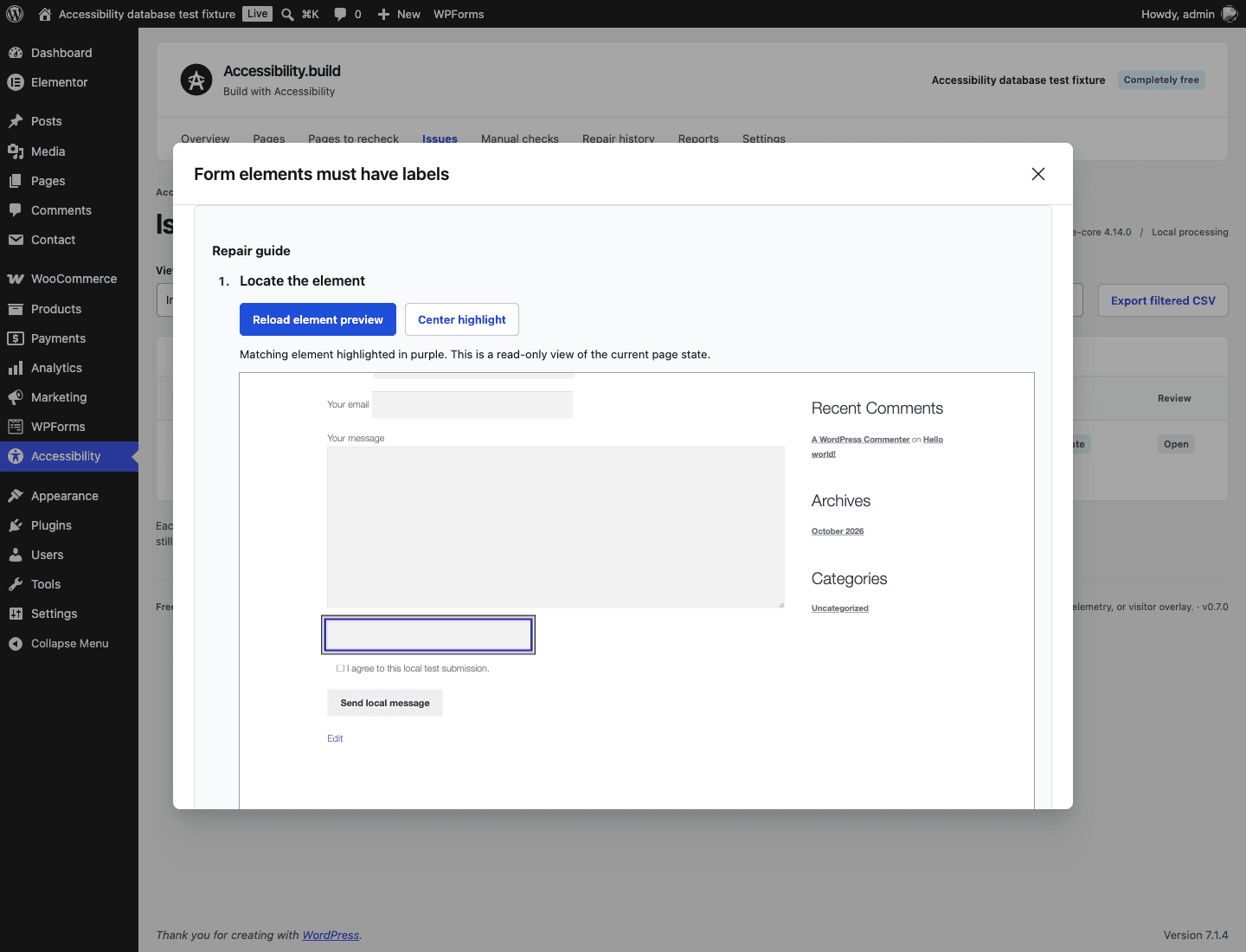
Open a private, read-only page preview from a finding. A purple outline marks the element only when its selector and recorded evidence match. Missing, changed, hidden or ambiguous elements receive an explanation. Normal visitor pages receive no overlay.
Follow the owning editor
Four steps connect locating, source identification, repair advice and rechecking. Choose guidance for Gutenberg, Elementor, WooCommerce, Contact Form 7 or WPForms Lite. Supported native repairs stay guarded; generated fields are changed in their own tool.
Repair the content you own
Review image alternatives, native heading levels and text, plain-text links, and labels in static Custom HTML forms. Preview each supported change, save it, recheck the rendered result, and undo while the source still matches.
Compare against a reference
Choose a scan as the baseline for a page, rule profile, and viewport. Later compatible scans show new, changed, still detected, no-longer-detected, and unverified findings with before/after evidence. A baseline is not an accessibility approval.
Find pages to recheck
One admin inbox explains automated rechecks and manual-review tasks. Recorded reviews need attention after tracked changes, when their review date arrives, or while steps are untested, blocked, or have an issue. Automated scans cannot clear manual tasks.
Follow a manual testing guide
Eight starter guides provide steps and expected behaviour. Record the page state, browser, assistive technology, observations and an optional review date. Repeat the same review with new outcomes while preserving earlier sessions.
Review content in context
Filename-like image alternatives and common generic English links receive targeted review prompts. These are separate from axe failures and baseline counts. Review meaning before changing content; a prompt is not a WCAG determination.
Group repeated findings
Bring matching rule, selector and HTML evidence together across pages. Each page keeps its own review decision, freshness and repair boundary. Matching evidence can suggest a shared component, but does not prove ownership.
Take your testing history with you
Export every retained manual session for a page as standalone HTML, JSON or CSV, including testing context, guide instructions, observations and earlier notes. Scan reports and repair history remain in the same free admin workspace.
Monitoring is user-initiated. Keep the admin tab open while scans run. The queue can be paused and resumed. This release does not run unattended scans or send background alerts.
Repairs have explicit boundaries. Native static blocks and supported Custom HTML are covered. Third-party form builders, shared templates, complex links, and dynamic content still need their owning editor.
Official free editions · local compatibility testing
Works with the tools your pages are built with.
We test rendered scans, saved changes, review tasks, supported repairs and diagnostic privacy in representative combinations. These checks cover the plugin’s workflows; they do not establish that a theme, builder or website is accessible.
Nine free themes
Twenty Twenty-Five, Astra, Hello Elementor, GeneratePress, Kadence, Blocksy, OceanWP, Neve and Storefront.
Tested with native WordPress content and selected builder combinations. Custom child themes and every theme setting need their own checks.
Seven builders and block libraries
Elementor, Beaver Builder Lite, SiteOrigin, Brizy, Spectra, Kadence Blocks and GenerateBlocks.
Builder pages support scans and review records. Edit builder-owned content in that builder; native repair and undo controls protect it. Supported native blocks alongside block libraries can still use guided repairs.
Caching and optimization
WP Super Cache, WP Fastest Cache, W3 Total Cache, Autoptimize and LiteSpeed Cache.
Private diagnostics bypass supported caching and optimization. LiteSpeed server caching requires a supported server; Apache optimization is a separate configuration.
WooCommerce, Contact Form 7 and WPForms Lite
Version 0.5.4 introduced testing to real form submissions and WooCommerce classic and block checkout on Storefront, Astra and Twenty Twenty-Five. Checks include required-field errors, consent, confirmation, cart changes, variations, coupons and local orders using an offline payment method. Selected caching and mobile journeys are included.
Shared form changes and tracked store changes now flag recorded evidence for review. The admin panel explains which journeys need separate checks, and an empty-cart checkout scan gives a useful retry message. Generated fields stay under the control of their form or store editor.
These are functional compatibility checks, with accessibility findings recorded separately. We also found third-party checkout contrast and ARIA issues that remain present with this plugin disabled. Live payment gateways, actual email delivery, premium extensions, every configuration and human screen-reader journeys still need testing. Scans do not submit forms or place orders; compare the same cart and customer state and record interactions in Manual checks.
Check the page visitors receive, too.
Scans run as the signed-in administrator. A cache or CDN can serve visitors different or older HTML, including briefly after a repair. Let the cache refresh or purge the affected page, then check the signed-out page and relevant interactions. Paid editions, host-level caches and all possible combinations are outside this test matrix. Everything in this plugin remains completely free.
Measured comparison · 30 October 2026
Learn from the other free tools.
We tested official free releases on shared Gutenberg, Elementor, WooCommerce and form fixtures. Our scanner detected all eight seeded structural issues on each of the three content pages, as did Sa11y and WeAreDev. Other tools brought useful editorial guidance and different repair workflows. This small local comparison does not establish an overall winner.
More useful content reviews
Sa11y, Editoria11y and Equalize Digital highlighted a gap in our targeted editorial guidance. Version 0.6.0 adds filename-alternative and generic-link prompts, while keeping human judgment explicit and preserving the existing guarded repair flows.
Less repeated triage
WeAreDev demonstrated useful grouping in its admin workspace. Our new grouped view brings matching findings together and preserves each page’s decisions and stale status. After a shared change, every affected page still needs another check.
The report separates structural seeds, editorial review signals, valid controls and unsupported or unmeasured features. WP Accessibility and BEARS have different scopes; Elementor Web Accessibility’s service-dependent scan was not completed in the local lab. Checkout state, paid editions, production performance and full human accessibility evaluation remain separate work.
Download the benchmark methods and results (Markdown)Part of every testing plan
Keep people in the testing process.
Choose a page and start a guided session in Manual checks. Record step outcomes and observations, preserve previous sessions, and set a review date. Due dates use your WordPress site timezone and appear when the workspace is opened or refreshed; this release does not send email reminders. These areas need human evaluation:
- Keyboard and focus
- Complete real tasks without a mouse. Check focus order, visibility, traps, and controls that appear after interaction.
- Screen readers
- Check names, roles, reading order, announcements, and complete journeys using relevant browser and assistive-technology combinations.
- Zoom, reflow, and content
- Review enlarged text, narrow layouts, meaningful alternatives, heading structure, instructions, captions, and information conveyed by color.
- Forms and dynamic states
- Test errors and recovery, grouped fields, menus, dialogs, authentication, and checkout where relevant. Include disabled people in testing real tasks where possible.
Completely free. A separate WordPress product.
Build with Accessibility shares the Accessibility.build brand. It operates independently of this website’s paid tools and services. Plugin features do not require purchases, a subscription, an account, or API credits.
- Local scan processing and records
- All repairs, manual sessions, history, review dates and exports included
- No plugin telemetry or required cloud service
- No scanner or overlay on ordinary visitor pages
Reports and repair records can contain page snippets and before/after content. Store and share them with care. The current build retains records when deactivated or uninstalled; saved content repairs remain in the page.
Try the development preview on staging
- Download the ZIP and upload it through Plugins → Add New → Upload Plugin.
- Activate it, then open Accessibility in WordPress administration.
- Scan a representative page, inspect the findings, and record a guided manual testing session for an important page state.
- Review a supported repair, save, recheck, and test undo before using the workflow more widely.
Version 0.7.0 adds inline element highlighting in a private admin preview and step-by-step repair guidance for native content, Elementor, WooCommerce and forms. Source links are permission checked; the preview does not modify content or mark findings fixed. Frame and shadow-root findings, hidden states and evidence that cannot be matched still need manual inspection. Version 0.6.0 introduced content-review prompts and repeated-finding groups. Earlier releases cover the theme/cache matrix, commerce/form journeys, browser checks and database upgrades described above; those historical matrices are separate from current feature testing. Managed hosting, paid editions, additional configurations and human screen-reader testing remain release work. WordPress.org review is a separate code and directory-policy review; it is not a certification of website accessibility.
Report a plugin issue or share feedback